Wine cellar spreadsheet template — free
A ready-made spreadsheet for your wine cellar: download it, overwrite the example rows, and start. No sign-up, no email address.
Works with Excel, Numbers, LibreOffice and Google Sheets (File → Import). The CSV file has the Cellar columns, minus the calculated ones.
What's in the template
Two sheets, built like the Corko app and using the same terms:
- Cellar — one row per wine and vintage. The essentials come first: what you have, where it is and what to open next. Four example rows show how it is meant.
- Overview — works itself out, like the app's home screen: bottles, ready, ending soon and overdue, plus bottles by colour.
The columns — and why they're there
| Column | What it is for |
|---|---|
| Producer, Wine, Vintage | The minimum to find a bottle again without doubt. The same wine from two vintages gets two rows. |
| Colour | A drop-down with the app's own terms — red wine, white wine, rosé, orange wine or other. |
| Quantity, Location | How many bottles are where. "Rack 2, bottom left" helps more when you reach into the dark than any other column. |
| Drink from, Drink until | The drinking window as years — your own estimate. For a starting point, see our rules of thumb for how long to cellar wine. |
| Status | Works itself out from the window: Age it, Ready, Drink soon, Overdue or Open — colour-coded like in the app. |
| Type, Sweetness | Still, sparkling or fortified; dry to sweet. So the list filters cleanly. |
| Grape(s), Region | Small growers don't always put everything on the label. Write it down once and you never have to look it up again. |
| Alcohol-free | Yes or no — so alcohol-free wines are easy to find. |
| Gift from, Price per bottle | Who gave you the bottles — empty means bought. The price helps when reordering from the same grower. |
| Notes | Occasion, recommendation, food pairing, magnum — whatever you would otherwise forget. |
Using the list day to day
- Filter by status. "Drink soon" and "Overdue" show what is due next.
- Update the moment you open a bottle. Quantity down by one — ten seconds, if it happens right away.
- Reconcile once a year. Walk through the cellar and check the counts. The mismatches show where logging slips in everyday life.
Spreadsheet or Corko?
This template is a good start — and for a few dozen bottles often all you need. It gets tedious where the list depends on you keeping it current: typing, logging, checking on the computer. That is exactly what we are building Corko for.
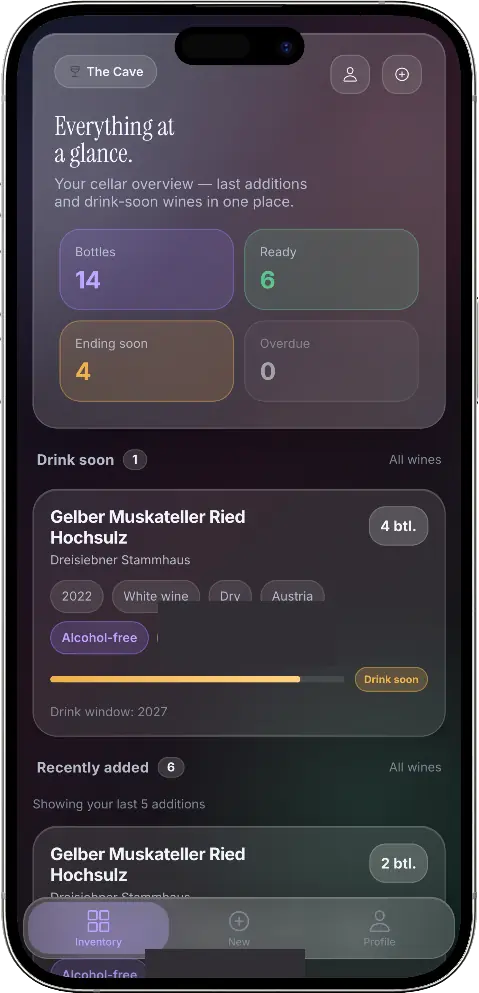
| Day to day | Spreadsheet (this template) | Corko |
|---|---|---|
| Adding a wine | Type it in | Photograph the label — including small growers no database knows |
| Opening a bottle | Change the quantity by hand — what was drunk when is lost | Recorded as its own entry: when, with a rating, and whether it was too young or just right |
| At the rack | The list is on your computer | The cellar is on your phone |
| Drinking window | Your own year | A hint that shows what it is based on — rule of thumb, producer or you |
Corko is currently in testing. Join the waitlist and we'll let you know when it's available. More on what cellar management should do: wine cellar management.
Frequently asked questions
Is the template really free?
Yes. Download it directly, no sign-up and no email address. The waitlist further down is completely separate.
Does it work with Google Sheets, Numbers or LibreOffice?
Yes. The .xlsx file opens in every common spreadsheet app; in Google Sheets use File → Import. The CSV file is the plain alternative, without formulas or colours.
How many bottles before a spreadsheet stops working?
There's no fixed number. What matters more is how much moves in and out, whether several people keep the list, and whether you have it with you when you're standing at the rack.
Can I move my list into an app later?
The template is built like the Corko app — same columns, same terms. And a clean list with one column per detail is the best starting point for any later move, to another spreadsheet or to an app.
When the spreadsheet gets too small
We're building Corko for exactly that moment: capture wines by photographing the label — including growers no database knows — record every opened bottle as its own entry instead of counting down a number by hand, and have the cellar with you when you're standing at the rack. Corko is currently in testing; join the waitlist and we'll let you know the moment it's available.